100%
  • Home
  • Courses
    • View All
Login
  • Home
  • Courses
  • Log In
  • View All
Home WordPress Training Program Getting started with WordPress 📣 Understanding WordPress Database Schema

Course Lessons

WordPress Training Program

1 Getting started with WordPress 📣
  • What is WordPress
  • Creating a blog and writing daily updates ✍️
  • Installing WordPress
  • WordPress Terminology 📃
  • How WordPress works
  • Understanding WordPress Database Schema
  • Using themes and plugins
2 Setting up Development Environment 👨‍💻
  • Introduction to Git and SVN 🔄
  • Setting up an Integrated Development Environment (IDE)
  • Pushing changes to site via Git commits/branches
  • Setting up Z shell and Oh My Zsh for fast command line work
3 Coding Standards and Best Practices 💯
  • WordPress Coding Standards (WPCS)
  • PHP_CodeSniffer (PHPCS)
  • Peer Code Review
  • Security 🛡️
  • WordPress Documentation Schema
4 Plugin Development 🛠️
  • Introduction to plugin development
  • Hooks: Actions and Filters
  • Custom Post Types and Taxonomies
  • WordPress Core APIs
  • WP_Query (Custom Query)
  • WordPress AJAX
  • Interacting with remote data and APIs
  • Plugin development assignment
5 Theme Development 👀
  • Anatomy and architecture of a theme
  • Theme Stylesheet and Functions file
  • Template files and hierarchy
  • Customizer
  • Asset Building using Webpack & Babel
  • Child Themes
  • Handling Media in WordPress
  • Theme development assignment
6 Debugging 🐞
  • Introduction to Xdebug
  • EasyEngine site debugging with docker commands
  • How to check Nginx, PHP, and WP Debug logs
7 Advanced Concepts 📜
  • WP-CLI
  • REST API
  • Roles and Capabilities
  • Caching
  • Custom Database Table Creation
  • Optimization ⚡
  • Users and User metadata
  • Cron ⏳⚙️
  • Background Processing
  • Internalization and Localization 🌐
  • Multisite
  • Email with WordPress 📧
8 Block Editor (Gutenberg) 🏗️
  • Default Blocks
  • Creating a block
9 Testing 🤓
  • PHPUnit Test
  • JavaScript: QUnit, Jest
  • ESLint, JSLint, JSHint, JSCS
  • CSS: Stylelint
10 Extras 😃
  • Decoupled
  • GraphQL
  • React and Next.js
  • WooCommerce 🛒
  • Accessibility (WCAG 2.0) 🔍
11 Contributing to WordPress ❤️
12 Server Side 🖥️
  • How to check CPU/Memory/Disk Space on a server
  • Rsync and SSH basics
  • How to sync one site with other using WP-CLI and rsync
  • Tmux basics
13 Congratulations 🥳
Return to WordPress Training Program

Trainer(s)

There is no group/trainer

WordPress Training Program

Understanding WordPress Database Schema

Since WordPress is a dynamic PHP-based application, it requires a database to store all the important data. WordPress uses MySQL to manage database tables and it supports MySQL version 5.6 or greater and MariaDB version 10.1 or greater.

You can have a look at the below image to better understand the tables present in the database of a standard WordPress installation and how they are connected –
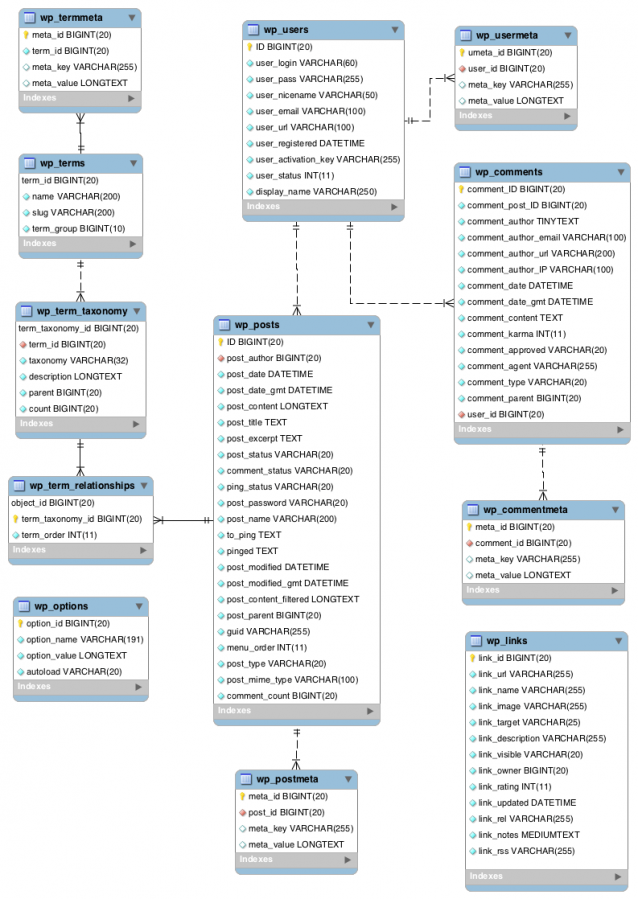
WordPress Database Structure
Image: WordPress Database Diagram | Courtesy: WordPress.org

For an even better understanding, you may watch the video below –

Mo Jangda: The Database Schema from WordPress.tv | (CC BY-SA 4.0)

Or you can read more about WordPress Database Schema from the Database Description codex page.

← Previous Topic

Copyright 2017-25 All Rights Reserved | Designed by WisdmLabs